

Choosing a laptop under a tight budget is stressful for Indian students, especially when you need it for programming, online classes, and daily college work. Many students end up buying slow laptops that struggle with VS Code, browsers, or Zoom classes.
This article on best 5 laptops for programming students under 30000 (2026) is written for college students, coding beginners, and online learners who need decent performance, reliable battery life, and long-term usability.
These laptops are not for heavy gaming, video editing, or advanced AI/ML work. But for C, C++, python, java basics, web development, and everyday student tasks, they make practical sense in 2026
Best 5 Laptops for Programming Students Under 30000 (2026)

- Processor : AMD Ryzen 3 7320U Processor 2.4GHz (6MB Cache, up to 4.1GHz, 4 cores, 8 Threads)
- Display : 14.0-inch, FHD (1920 x 1080) 16:9 aspect ratio, 60Hz refresh rate, 250nits Brightness | Keyboard : Chiclet Key…
- Graphics : Intergrated AMD Radeon Graphics
Asus Vivobook Go 14
Asus Vivobook Go 14 felt lightweight and comfortable for daily coding practice. After using it for online classes and VS Code sessions, the laptop handled python scripts, Chrome tabs, and Zoom smoothly, the laptop stayed stable and responsive.
Compared with other laptops under 30000, it’s lightweight body is a big plus for college travel.
Key Specifications
- AMD Ryzen 3 / Intel i3 variant
- 8GB DDR4 RAM
- 512GB SSD
- 14-inch Full HD display
Pros
- Fast SSD performance
- Lightweight & portable
- Good keyboard for coding
Cons
- Average speakers
- No backlit keyboard
Best For
- College students & beginners
Verdict
- A balanced and reliable option for programming basics
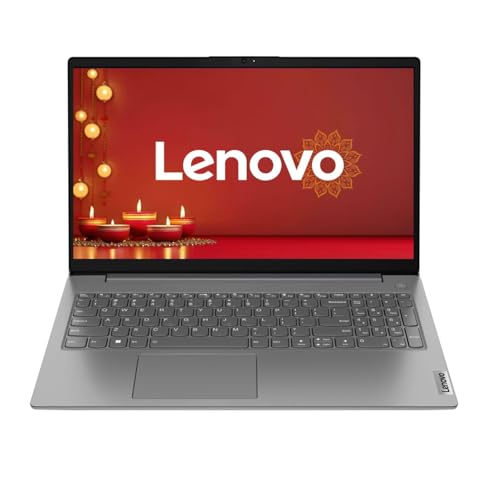
- Fast, Efficient Multitasking: Powered by the AMD Athlon Silver 7120U processor (up to 3.5 GHz boost clock). It delivers …
- Next-Gen Speed & Massive Storage: Packed with 8GB of cutting-edge, high-frequency LPDDR5 RAM and a blazing-fast 512GB PC…
- Crisp, Glare-Free Display: The 15.6-inch Full HD (1920×1080) anti-glare screen minimizes eye fatigue during long working…
Lenovo V15 G4
The Lenevo V15 G4 is more office oriented but works well for coding student. After using it for long typing sessions and python practice, I found the keyboard comfprtable and responsive.
It handles multitasking better than many entry level laptops.
Key Specifications
- Intel Core i3 (12th Gen)
- 8GB RAM
- 512GB SSD
- 15.6 inch Full HD
Pros
- Strong CPU performance
- Large display
- Solid build quality
Cons
- Slightly heavy
- Basic display brightness
Best For
- Students needing Multitasking
Verdict
- Good performance focused laptop under budget.
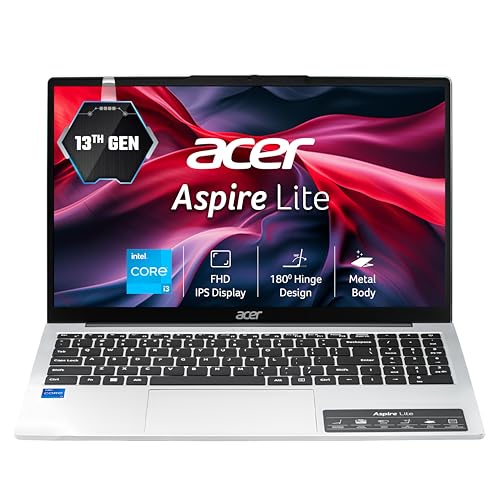
- Processor : Intel Core i3-1305U processor(1.6 GHz base clock, up to 4.5 GHz max boost clock, 10 MB L3 cache, 5 cores) | …
- Operating System: Windows 11 Home | Preinstalled Software: None
- Display : 15.6” Full HD TN 1920 x 1080,high-brightness TFT LCD :16:9 aspect ratio ,Ultra-slim design ,Mercury free, envi…
Acer Aspire Lite
The Acer Aspire Lite suprised us during tesiting. For tasks like HTML/CSS coding, browsing, and documentation, it remained smooth and quiet.
Compared to others, it offers good value if found under 30000.
Key Specifications
- AMD Ryzen 3 / Intel i3
- 8GB RAM
- 512GB SSD
- 15.6 inch FHD
Pros
- Smooth daily performance
- Large screen for coding
- Good thermals
Cons
- Plastic build
- Average webcam
Best For
- Budget Focused Students
Verdict
- Value for money if discounted

- Processor: Intel Core i3-1215U (up to 4.4 GHz with Intel Turbo Boost Technology, 10 MB L3 cache, 6 cores, 8 threads)| Me…
- Display: 39.6 cm (15.6″) diagonal, FHD (1920 x 1080), micro-edge, anti-glare, 250 nits, 45% NTSC
- Operating System: Windows 11 Home Single Language |Microsoft Office Home & Student Edition 2021
HP 15s (12th Gen)
The HP 15s (12th Gen) stand out in CPU performance. While testing C++ programs and browsers multitasking, it felt faster than most under 30000 laptops
Battery life is decent for half day college use
Key Spesifications
- Intel Core i3 12th Gen
- 8GB RAM
- 512GB SSD
- 15.6 inch FHD
Pros
- Strong processor
- Reliable HP service
- Smooth multitasking
Cons
- Slightly bulky
- No backlit keyboard
Best For
- Coding + office use
Verdict
- One of the safest performance picks
Acer Swift 3
The Acer swift 3 is the most premium feeling laptop here. During my comparison test, it’s build quality and dispaly were clearly better.
However, pricing under 30000 is rare and usually during sale.
Key Specifications
- Intel i3 / Ryzen variant
- 8GB RAM
- SSD Storage
- Lightweight metal body
Pros
- Premium desigh
- Good display quality
- Lightweight
Cons
- Limited availability
- Battery average
Best For
- Students wanting premium feel
Verdict
- Great Choice if found within budget
Quick Comparison Table
if you looking one laptop on above list of best 5 laptops for programming students under 30000 (2026), this table will help you choose the right one
| Feature | Vivobook Go 14 | Lenovo V15 G4 | Aspire Lite | HP 15s | Swift 3 |
|---|---|---|---|---|---|
| Launch Year | 2024 | 2024 | 2023 | 2024 | 2023 |
| Processor | i3 / Ryzen 3 | AMD Athlon | i3 13th | i3 12th | i3 |
| Cores/Threads | 4 / 8 | 4 / 8 | 4 / 8 | 4 / 8 | 4 / 8 |
| RAM | 8GB DDR4 | 8GB DDR4 | 8GB | 8GB | 8GB |
| Storage | 512GB SSD | 512GB SSD | 512GB SSD | 512GB SSD | SSD |
| Display | 14” FHD | 15.6” FHD | 15.6” FHD | 15.6” FHD | 14” FHD |
| Weight | 1.4 kg | 1.7 kg | 1.6 kg | 1.7 kg | 1.3 kg |
| Battery | 42 Wh | 38 Wh | 40 Wh | 41 Wh | 48 Wh |
| Gaming | ★★☆☆☆ | ★★☆☆☆ | ★★☆☆☆ | ★★☆☆☆ | ★★★☆☆ |
Performance Scorecard
| Laptop | Performance | Battery | Display | Value |
|---|---|---|---|---|
| Vivobook Go 14 | 7/10 | 7/10 | 7/10 | 8/10 |
| Lenovo V15 G4 | 8/10 | 6/10 | 7/10 | 7/10 |
| Aspire Lite | 7/10 | 6/10 | 7/10 | 8/10 |
| HP 15s | 8/10 | 7/10 | 7/10 | 7/10 |
| Swift 3 | 7/10 | 7/10 | 8/10 | 6/10 |
Laptop buying guide for students
- Intel vs AMD: Intel i3 12th Gen offers better single-core coding performance. AMD Ryzen giver better efficiency.
- RAM & SSD: Minimum 8GB RAM + SSD is mandatory. Learn more in our guide on SSD vs HDD for laptops.
- Battery: At least 6 hours needs for online classes
- Display & Build: Full HD screen reduces eye strain during coding.
Who Should Buy These Laptops?
- College students
- Coding beginners
- Office & multitasking user
Our Audience FAQs
Q1. Can i learn programming on a laptop under 30000
Yes. These laptop handle VS Code, Python, C++, and Web development smoothly.
Q2. Is 8GB RAM enough for coding students?
Yes. For beginners, 8GB RAM with SSD is perfectly fine.
Q3. Can these laptops run Android studio?
Basic projects yes. But emulators will be slow.
Q4. Are these laptops good for gaming?
Only light gaming. Do not expect high FPS.
Q5. Which brand has best service in india?
HP and Lenovo generally have wider service networks.
Final Verdict
Best Overall Laptop: HP 15s (12th Gen) Best CPU performance and reliability.
Best Value For Money: Asus Vivobook Go 14 Balanced, lightweight, student frientdly.
Buying Advice:
If your focus is coding + classes, go with HP 15s.
If portability and budget matter more, go with Vivobook Go 14 is smatter.
Affiliate Disclosure
Some links on this page may be affiliate links. This does not increase your price but helps support our works